Note
Go to the end to download the full example code.
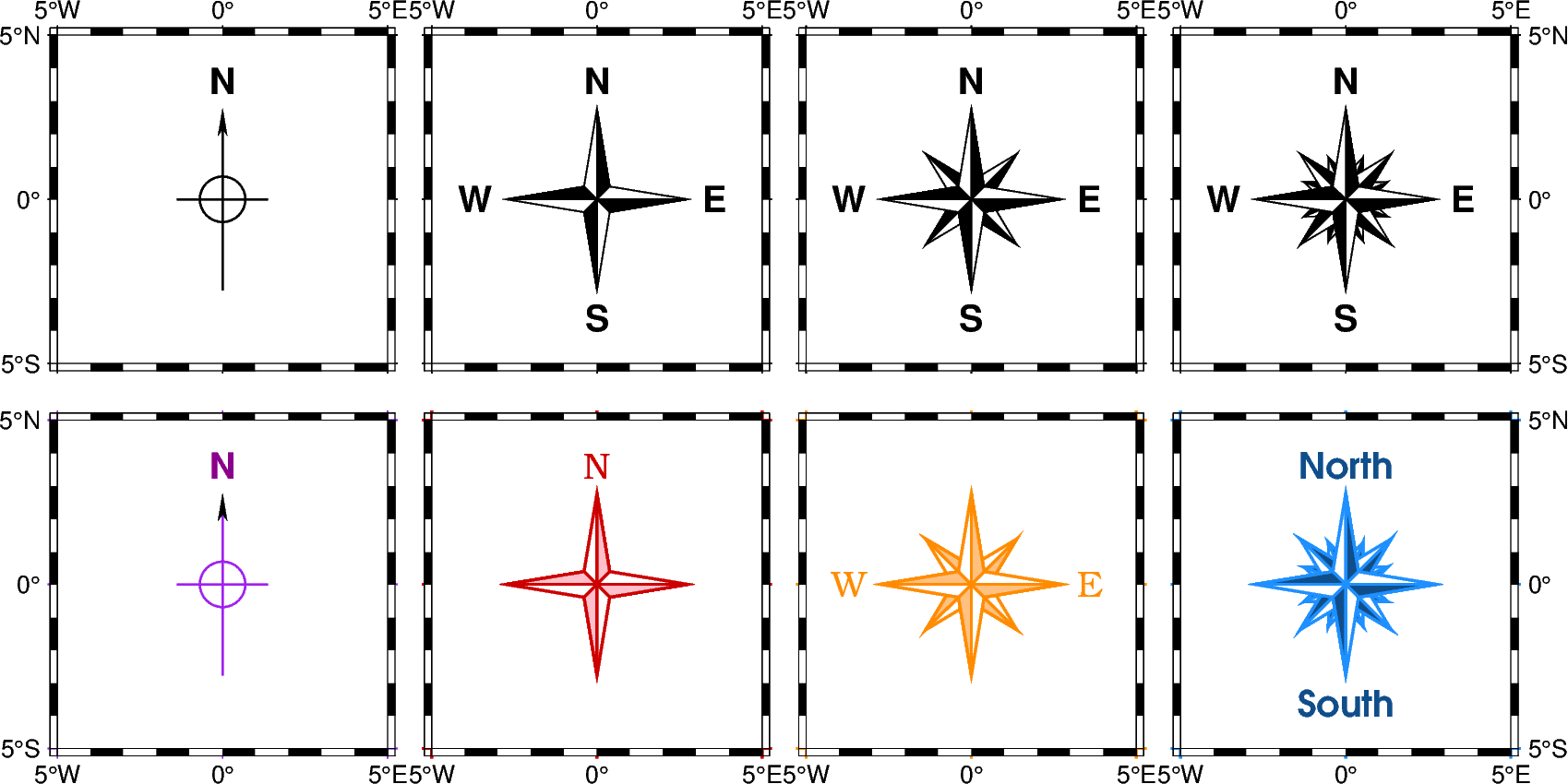
Directional map rose
The pygmt.Figure.directional_rose method allows to add
directional roses on maps. Using pygmt.Figure.directional_rose()
without any arguments will plot a rose at the bottom left corner,
but this example will focus on customizing its position and
apperance.
Colors of the map roses can be adjusted using MAP_DEFAULT_PEN
and MAP_TICK_PEN_PRIMARY via pygmt.config. Customizing
label font and color can be done via FONT_TITLE.
import pygmt
from pygmt.params import Position

fig = pygmt.Figure()

y0 = 20
y1 = -5
width = "1.5c"

fig.basemap(region=[-5, 80, -17, 32], projection="M10c", frame=True)


# Plain rose of 1.5 cm width showing an arrow towards North, a cross
# indicating the cardinal directions, and a label for the North direction
fig.directional_rose(
    width=width, labels=True, position=Position((0, y0), cstype="mapcoords")
)

# Fancy, 1.5 cm wide rose of level 1 and labels indicating the different directions
fig.directional_rose(
    width=width,
    labels=True,
    position=Position((20, y0), cstype="mapcoords"),
    fancy=True,
)

# Fancy, 1.5 cm wide rose of level 2 and labels indicating the different directions
fig.directional_rose(
    width=width,
    labels=True,
    position=Position((45, y0), cstype="mapcoords"),
    fancy=2,
)

# Fancy, 1.5 cm wide rose of level 3 and labels indicating the different directions
fig.directional_rose(
    width=width,
    labels=True,
    position=Position((70, y0), cstype="mapcoords"),
    fancy=3,
)

# Plain rose of 1.5 cm width showing an arrow towards North, a cross
# indicating the cardinal directions, and a label for the North direction.
# Colors of the rose and labels are defined via
# MAP_TICK_PEN_PRIMARY and FONT_TITLE, respectively
with pygmt.config(MAP_TICK_PEN_PRIMARY="purple", FONT_TITLE="8p,darkmagenta"):
    fig.directional_rose(
        width=width,
        labels=True,
        position=Position((0, y1), cstype="mapcoords"),
    )

# Fancy, 1.5 cm wide rose of level 1 with only one label indicating the North
# direction. Colors of the rose and labels are defined via
# MAP_DEFAULT_PEN, MAP_TICK_PEN_PRIMARY and FONT_TITLE, respectively.
with pygmt.config(
    MAP_DEFAULT_PEN="default,pink",
    MAP_TICK_PEN_PRIMARY="red3",
    FONT_TITLE="8p,Bookman-Light,red3",
):
    fig.directional_rose(
        width=width,
        labels=["", "", "", "N"],
        position=Position((20, y1), cstype="mapcoords"),
        fancy=True,
    )

# Fancy, 1.5 cm wide rose of level 2 with two labels indicating the West and
# East directions
with pygmt.config(
    MAP_DEFAULT_PEN="default,lightorange",
    MAP_TICK_PEN_PRIMARY="darkorange",
    FONT_TITLE="8p,Bookman-Light,darkorange",
):
    fig.directional_rose(
        width=width,
        labels=["W", "E", "", ""],
        position=Position((45, y1), cstype="mapcoords"),
        fancy=2,
    )

# Fancy, 1.5 cm wide rose of level 3 with two labels indicating the North and
# South directions
with pygmt.config(
    MAP_DEFAULT_PEN="default,Dodgerblue4",
    MAP_TICK_PEN_PRIMARY="Dodgerblue",
    FONT_TITLE="8p,AvantGarde-Demi,Dodgerblue4",
):
    fig.directional_rose(
        width=width,
        labels=["", "", "South", "North"],
        position=Position((70, y1), cstype="mapcoords"),
        fancy=3,
    )

fig.show()
Total running time of the script: (0 minutes 0.192 seconds)